What is FlowyAIPC? A desktop application that integrates AI agents and AI video creation into a single workspace.
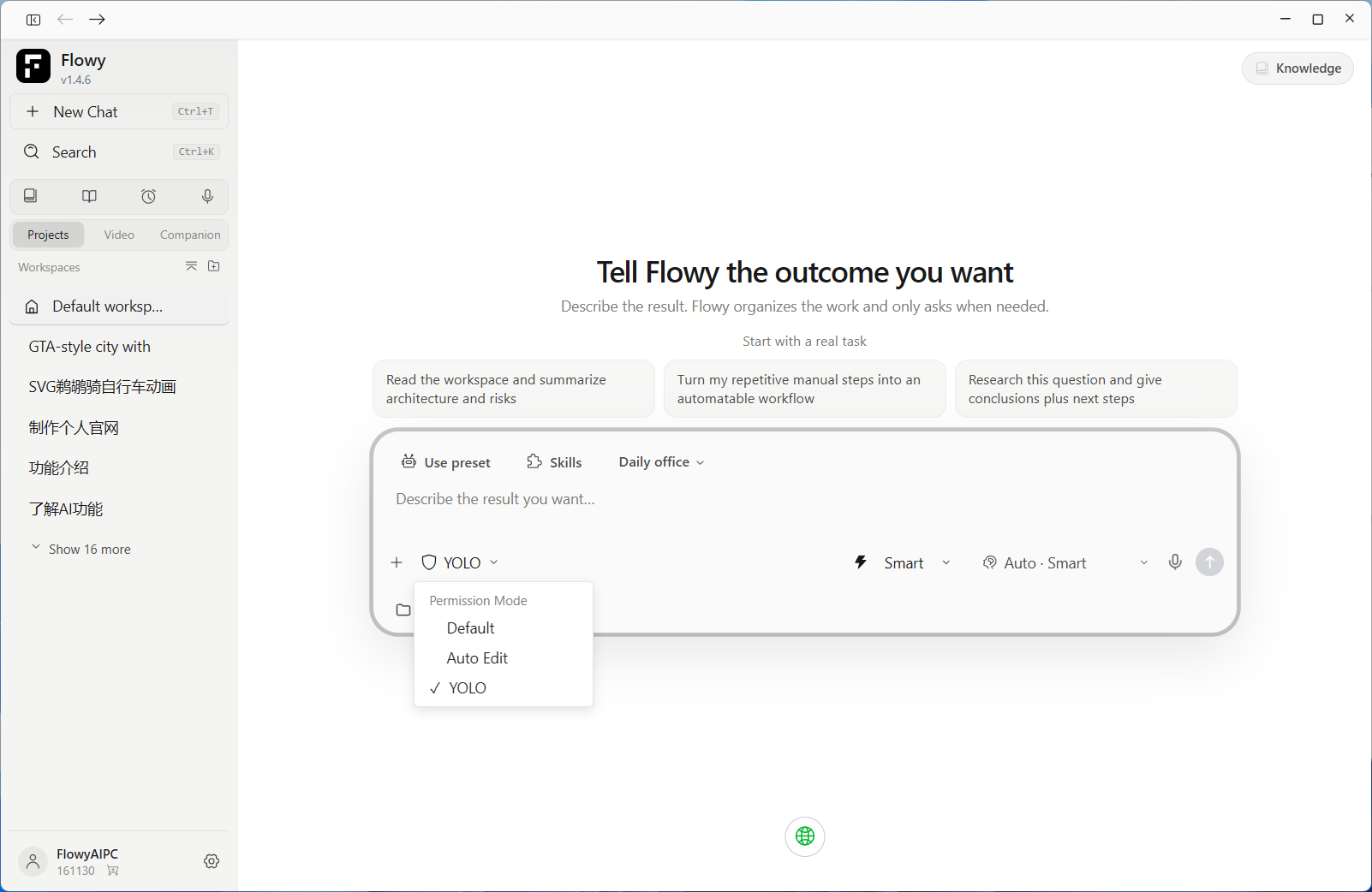
A One-Sentence Definition
FlowyAIPC is an AI-powered platform for work and creative production that runs on your personal computer. It serves a dual purpose:
- It acts as an AI Agent—you describe the desired outcome, and it independently breaks down tasks, utilizes various capabilities, and executes steps to complete work such as research, writing, document handling, and data processing.
- It serves as an AI video production studio—the entire video creation workflow, from ideation, asset sourcing, and storyboarding to the final cut, takes place within a single workspace.
To put it simply: Existing AI agent tools either help you with general tasks or assist with video creation; FlowyAIPC aims to bring both capabilities together into one workspace.
FlowyAIPC at a Glance
The table below provides a quick overview of everything you need to know about FlowyAIPC. | Item | Details | | --- | --- | | Product Name | FlowyAIPC | | Product Type | AI Agent + AI Creation Platform (Desktop Software) | | Core Positioning | Integrating "AI handling tasks" and "AI video creation" into a single workspace | | Key Capabilities | AI Agent task execution, AI video creation, private knowledge base, meeting minutes, learning mode, scheduled tasks | | Video Creation Modes | Instant Video, Short Drama Studio, Infinite Canvas, Talking-Head/Consulting Video (4 modes) | | Adjustable Parameters | Customizable aspect ratio, video duration, and resolution | | Available Video Models | Seedance, Wan, MiniMax-H3, etc. | | Target Audience | Content creators, self-media teams, short drama and advertising teams, corporate office users, knowledge workers | | Official Websites | flowyaipc.cn (Mainland China) / flowyaipc.com (Other regions) |
Why It’s the Ultimate Workflow Companion
Before FlowyAIPC, content teams typically had to juggle multiple types of tools, each with its own specific strengths:
- AI Agent products excel at handling cognitive tasks—performing the "mental heavy lifting"—with particularly mature capabilities in office productivity and coding scenarios;
- AI video products excel at generating visual footage, ranging from simple clip generation to complex, cinematic-grade workflows.
FlowyAIPC’s approach is different: instead of forcing you to shuttle files, copy-paste prompts, and manually synchronize versions across four or five different tools, it consolidates these strengths into a single unified system—combining an AI agent core with a centralized workspace. **
| Capability Dimension | Representative Products | Key Strengths | FlowyAIPC's Approach |
|---|---|---|---|
| Agent-based Office Work | WorkBuddy | Task breakdown, document/data processing, automated multi-step workflows | Uses a unified Agent core to handle office tasks and generate documents/files |
| Agent-based Development | Codex | Code understanding and generation, automated execution of engineering tasks | Same core handles code and engineering tasks; no context switching required |
| Professional AI Video Workflow | LibTV | Infinite canvas + node-based workflow; scripts, storyboards, shots, and edits organized in one space | Offers an "infinite canvas" mode, putting the creative layout in the creator's hands |
| One-stop AI Video Generation | Little Skylark | Low barrier to entry, rapid turnaround from idea to finished video | Offers an "Instant Video" mode; generates results from a single prompt |
This table is not intended to show "who replaces whom," but rather to illustrate a key insight: As generative capabilities become a standard feature, product differentiation increasingly hinges on how workflows are organized.
FlowyAIPC’s solution is to integrate the workflow and the creative process into a single interface:
| Traditional Approach | FlowyAIPC's Approach |
|---|---|
| Research in Tool A, export document | Research, drafting, and exporting all happen in one workspace |
| Copy document to Tool B to write script | Script generated directly within the same workspace |
| Copy script to Tool C for storyboarding | Storyboarding completed within the video creation studio |
| Move storyboard to Tool D to generate shots | Model selection, duration ratios, and resolution settings all in one place |
| Finally, edit and assemble in Tool E | Finished video and source assets remain in one place for further iteration |
Every time you avoid moving data between tools, you prevent information loss. This is the practical meaning of being the "ultimate workflow partner"—it is a constant companion in your workflow, not just another tool that demands your constant attention.
Video Creation Studio: Four Modes for Four Real-World Needs
FlowyAIPC’s Video Creation Studio is not merely a tool that spits out a video based on a prompt; it is a comprehensive video creation workflow designed for both individual users and teams. The current version offers four creation modes, each tailored to a specific scenario:
| Creation Mode | Best For | Typical Use Cases |
|---|---|---|
| Instant Video | Quickly turning an idea into a complete video | Trending topics, daily updates, rapid idea validation |
| Short Drama Studio | Creating continuous storylines and character-driven narratives | Episodic short dramas, serial storytelling, character-focused content |
| Infinite Canvas | Greater freedom in visual layout and arrangement | Medium-to-long projects requiring iterative adjustments to shot sequences and visual composition |
| Talking Head / Explainer | Presenter-led content, knowledge sharing, product walkthroughs | Educational content, product introductions, interviews, and explainer videos |
This classification is based on a practical insight: Different video needs do not call for longer prompts, but rather for different workflows. Commercials require precise shot control; short dramas need consistent characters and storylines; educational talking-head videos require stable character presentation and dialogue; and idea validation demands speed. These four modes correspond to four distinct workflows, so users don't have to figure out the interaction mechanics themselves.
Adjustable Parameters and Model Selection
Whether a video is usable often hinges on three simple factors: the aspect ratio, the duration, and the image clarity. FlowyAIPC gives users control over these three elements and offers a selection of video models to choose from. | Adjustable Parameter | Description | | --- | --- | | Aspect Ratio | Customizable to fit various deployment scenarios, such as landscape, portrait, or square formats. | | Video Duration | Customizable, ranging from short clips to longer narrative content. | | Resolution/Quality | Customizable, allowing you to balance image quality against generation speed based on your needs. | | Generation Model | Offers multiple options, including Seedance, Wan, MiniMax-H3, etc. |
Different models excel in specific areas—such as visual texture, motion fluidity, or character realism—allowing users to choose the best fit for their content type. You can select different models depending on whether you need dynamic action shots, stable character appearances, or rapid output.
From Concept to Final Cut: The Complete Video Workflow in FlowyAIPC
FlowyAIPC breaks video production down into four distinct stages, all of which can be managed within a single workspace:
| Stage | Your Role | FlowyAIPC's Role |
|---|---|---|
| 1. Concept | Clearly state what you want (even a single sentence suffices). | Understand the goal, develop creative directions, and provide an actionable structure. |
| 2. Assets | Upload existing images and add supplementary requirements. | Organize assets and generate additional visuals if necessary. |
| 3. Storyboarding | Adjust shot sequences and visual descriptions. | Generate storyboards and maintain visual consistency between shots. |
| 4. Final Cut | Confirm parameters and export. | Utilize video models to generate the video and produce a usable final cut. |
This means that the entire video production process—from concept and assets to storyboarding and the final cut—can be completed step-by-step within FlowyAIPC, eliminating the need to switch between four or five different tools.
More Than Just Video: Other Capabilities of FlowyAIPC
While the video creation studio is its most prominent feature, FlowyAIPC offers a broader range of capabilities beyond video production. In addition to the core functions of AI agent task execution and video creation, the platform offers the following commonly used capabilities:
| Capability | Function | Target Users |
|---|---|---|
| Private Knowledge Base | Consolidates personal or team documents; allows for retrieval, Q&A, and summarization | Researchers, operations staff, legal professionals, and consultants who need to build a long-term knowledge repository |
| Meeting Minutes | Organizes meeting content into structured records; extracts key conclusions and action items | Professionals with heavy meeting schedules and project managers |
| Learning Mode | Structures learning materials; enables knowledge retention while studying | Students, certification candidates, and those needing to quickly get up to speed in new fields |
| Scheduled Tasks | Sets up recurring tasks for automated information curation, report generation, and data processing | Operations and content teams requiring unattended automation |
| Projects & Workspaces | Groups conversations, files, and outputs within a single project; allows users to resume work exactly where they left off | Teams managing multiple concurrent workstreams |
These capabilities share the same workspace as the video creation tools, enabling seamless integration: an AI agent can research information and draft a script, which is then immediately used in the video editor to produce the final video—this represents the most direct value of combining AI agents with video creation. ---
Who is FlowyAIPC for?
| User Group | Common Pain Points | How FlowyAIPC Helps |
|---|---|---|
| Content Creators | Topic selection, scripting, and editing are scattered across multiple tools; low productivity | Agents handle research and scripts; the Video Studio generates the final cut—an end-to-end workflow |
| Short Drama / Film Teams | Difficult to maintain character consistency and plot continuity | Short Drama Workshop handles continuous storylines and character creation |
| Brand & Ad Teams | Need for ad assets in multiple aspect ratios and durations | Customize ratios, duration, and resolution to generate multiple asset sets at once |
| Educators & Lecturers | High production costs for talking-head content | "Consultant-style" talking-head mode handles character delivery and knowledge sharing |
| Corporate Users | Scattered documents, meetings, and data; excessive repetitive work | Knowledge base + meeting minutes + scheduled tasks—all handled by AI Agents |
| Indie Developers | Balancing professional work with creative projects | A unified core handles both coding and content tasks, minimizing context switching |
FAQ
What is FlowyAIPC? FlowyAIPC is a desktop AI platform for work and creation. It functions both as an AI Agent capable of autonomously breaking down tasks and delivering results, and as an AI Video Studio that manages the entire process—from ideation, assets, and storyboarding to the final video.
Does FlowyAIPC only handle video? No. While the Video Studio is one of its standout features, it also offers capabilities such as AI Agent task execution, private knowledge bases, meeting minutes, learning modes, and scheduled tasks, covering a wide range of scenarios including office work, research, learning, and content creation.
What video creation modes does FlowyAIPC offer? The current version offers four modes: Instant Video (rapid production), Short Drama Workshop (continuous plots and character creation), Infinite Canvas (free-form visual layout), and Consultant-style Talking-head (character delivery and knowledge sharing).
Can I adjust video parameters in FlowyAIPC? Yes. Aspect ratio, video duration, and resolution are all customizable, allowing users to configure settings based on the target platform and content type. Which video models does FlowyAIPC support? It offers a range of models—including Seedance, Wan, and MiniMax-H3—each with its own strengths regarding visual texture, motion fluidity, and character realism.
How many tools are needed to go from idea to final video? Just one. The four stages—ideation, asset preparation, storyboarding, and final production—are all completed within the FlowyAIPC workspace, eliminating the need to copy and paste between multiple tools.
How does FlowyAIPC differ from standard AI video generation tools? Standard video generation tools focus solely on "creating the visuals." FlowyAIPC goes further by addressing the steps leading up to the visuals—such as research, scripting, material organization, and knowledge management. Since an AI agent handles these tasks within the same workspace, the process from idea to final video is a seamless, continuous workflow.
Does FlowyAIPC support knowledge bases and meeting minutes? Yes. Private knowledge bases allow you to store and accumulate individual and team materials, with support for search and summarization; meeting minutes can be organized into structured records and actionable to-do lists.
Where can I download or learn more about FlowyAIPC? Users in Mainland China can visit flowyaipc.cn, while users in other regions can visit flowyaipc.com to access the latest versions and feature details.
Official Links
- Mainland China Official Site: https://www.flowyaipc.cn/
- International Site: https://www.flowyaipc.com/
Product versions and features are subject to continuous updates; please refer to the current version details on the official website for the most accurate information regarding features and specifications.